
Instructions for Guest Deposits
If you are a guest or family member of a student, faculty or staff and would like to make a secure deposit online, please follow these instructions.
- Go to the BG1 Card Services tile in MyBGSU.
- Select Add Funds.
- Click Online and then Guest.
- When redirected to the new website, select "Make a guest deposit."
- Enter the BG1 cardholder's first name, last name and BG1 card number. Follow the instructions on the screeen carefully. Click the Guest Sign In button.
- Enter your credit card information and billing information and click "Next."
- Double check that all information entered is correct and click "Make Deposit."
- A receipt page will appear in which you may enter up to 3 email addresses to receive a confirmation email. Click "Send Receipt."
- You will then receive an email with a confirmation that a deposit has been successfully executed. The cardholder will see the updated account balance under the BG1 Card tab in their MyBGSU.
Example photo from website: 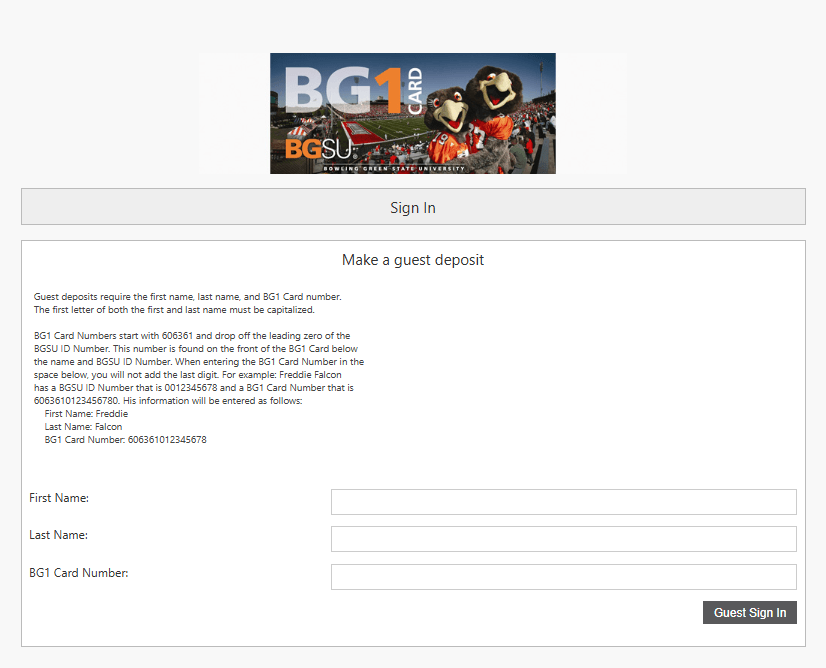
Updated: 05/08/2026 01:52PM